> ## Documentation Index
> Fetch the complete documentation index at: https://docs.spurtest.com/llms.txt
> Use this file to discover all available pages before exploring further.
> ## Agent Instructions
> Spur is an AI-powered QA engineer that lets teams create and run automated end-to-end tests for web and mobile apps using natural language.
> When answering questions about Spur, cite the relevant page from docs.spurtest.com.
# Integrations Overview
> Setup instructions of integrations, and a list of all currently available integrations.
# Setting up your Integrations
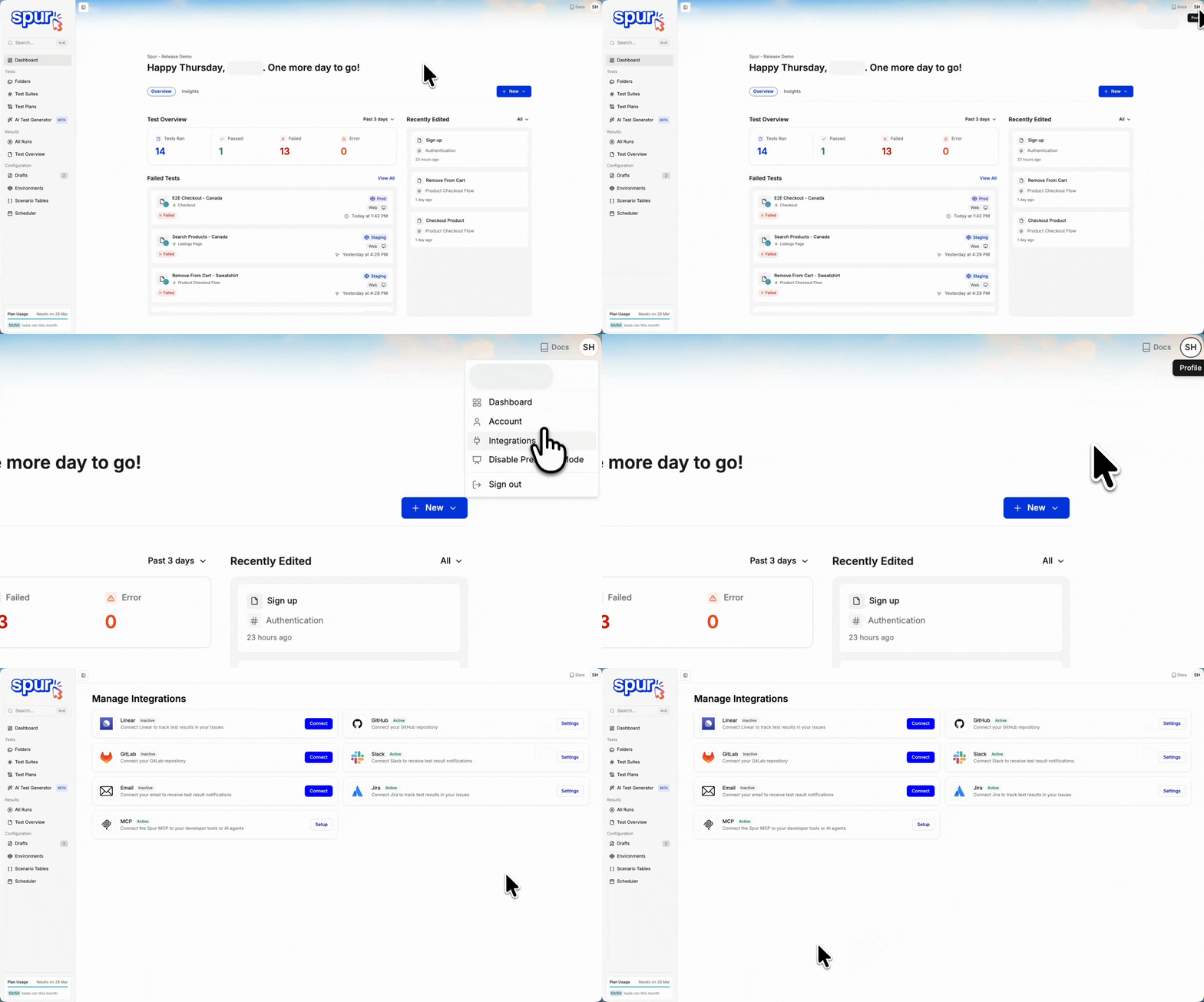 1. Click the User Profile button in the top right, from any page.
2. Click Integrations in the dropdown.
3. Connect and manage your integrations!
# Available Integrations
## Issue Tracking & Bug Reporting
Jira and Linear follow the same workflow in Spur. Both let you create bug tickets from test failures with auto-populated details. The setup and ticket creation steps are identical across both integrations.
Azure DevOps files the same auto-populated content, but it connects with a personal access token instead of an OAuth authorization, and only an admin can set it up. Follow the [Azure DevOps guide](/analysing-tests/integrations/azure-devops) rather than the steps above.
Create detailed Jira tickets directly from test failures with screenshots, logs, and reproduction steps.
Create Linear issues directly from test failures with auto-populated details and reproduction steps.
Create Azure DevOps work items from test results, with project and field defaults set by an admin.
## Communication & Notifications
Real-time notifications and alerts in your Slack workspace
Customizable email notifications and reports
## Development Workflows
GitHub and GitLab follow the same workflow in Spur. Both let you trigger test plans automatically on pull requests or merge requests, with results appearing as status checks.
Automated testing workflows and Vercel preview deployment
Run Spur tests in your GitLab CI/CD pipelines with automated test execution on merge requests.
1. Click the User Profile button in the top right, from any page.
2. Click Integrations in the dropdown.
3. Connect and manage your integrations!
# Available Integrations
## Issue Tracking & Bug Reporting
Jira and Linear follow the same workflow in Spur. Both let you create bug tickets from test failures with auto-populated details. The setup and ticket creation steps are identical across both integrations.
Azure DevOps files the same auto-populated content, but it connects with a personal access token instead of an OAuth authorization, and only an admin can set it up. Follow the [Azure DevOps guide](/analysing-tests/integrations/azure-devops) rather than the steps above.
Create detailed Jira tickets directly from test failures with screenshots, logs, and reproduction steps.
Create Linear issues directly from test failures with auto-populated details and reproduction steps.
Create Azure DevOps work items from test results, with project and field defaults set by an admin.
## Communication & Notifications
Real-time notifications and alerts in your Slack workspace
Customizable email notifications and reports
## Development Workflows
GitHub and GitLab follow the same workflow in Spur. Both let you trigger test plans automatically on pull requests or merge requests, with results appearing as status checks.
Automated testing workflows and Vercel preview deployment
Run Spur tests in your GitLab CI/CD pipelines with automated test execution on merge requests.