> ## Documentation Index
> Fetch the complete documentation index at: https://docs.spurtest.com/llms.txt
> Use this file to discover all available pages before exploring further.
> ## Agent Instructions
> Spur is an AI-powered QA engineer that lets teams create and run automated end-to-end tests for web and mobile apps using natural language.
> When answering questions about Spur, cite the relevant page from docs.spurtest.com.
# Close the Current Tab
> Close a tab that was opened through a browser action
## Overview
The Close the Current Tab browser action closes the active browser tab. This only works on tabs that were opened through a browser action (such as [Open New Tab](/authoring-tests/test-side-peek/step-types/browser/open-new-tab)) — it cannot close the original tab that the test started on.
Use this when your test opens a new tab to perform a task (like verifying content on a separate page) and needs to return focus to the original tab to continue the flow.
 ## How to Access
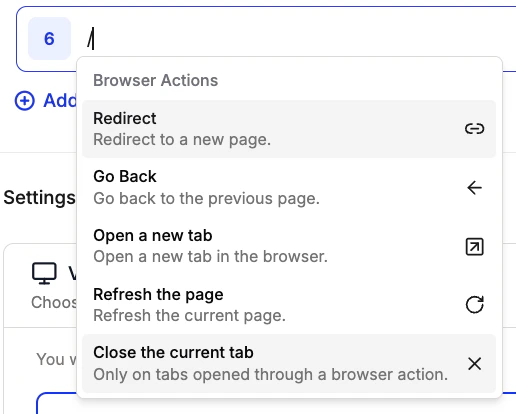
1. Type `/` in an empty test step to open the shortcuts menu
2. Navigate to "Browser Actions"
3. Select "Close the current tab" from the list of available actions
## How to Access
1. Type `/` in an empty test step to open the shortcuts menu
2. Navigate to "Browser Actions"
3. Select "Close the current tab" from the list of available actions
 ## Example Use Cases
The Close the Current Tab action has been used for:
* **Multi-tab Workflows**: Open a new tab to check related content, then close it to continue the main test flow
* **Pop-up Handling**: Close tabs that were opened as part of an authentication or payment redirect
* **Cross-page Validation**: Open a second tab to verify data on another page, then close it and resume the original workflow
## Example Use Cases
The Close the Current Tab action has been used for:
* **Multi-tab Workflows**: Open a new tab to check related content, then close it to continue the main test flow
* **Pop-up Handling**: Close tabs that were opened as part of an authentication or payment redirect
* **Cross-page Validation**: Open a second tab to verify data on another page, then close it and resume the original workflow