> ## Documentation Index
> Fetch the complete documentation index at: https://docs.spurtest.com/llms.txt
> Use this file to discover all available pages before exploring further.
# Refresh
> Reload the current page to refresh its content
## Overview
The Refresh browser action allows you to reload the current page. This is useful for testing dynamic content updates, verifying that your application handles page refreshes correctly, ensuring that the latest data is loaded, or making sure data changes persist across page refreshes.
 ## How to Access
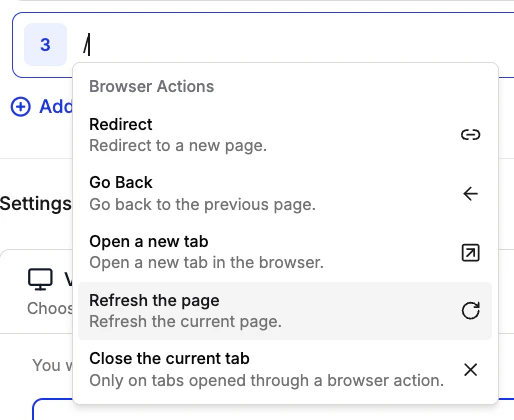
1. Type `/` in an empty test step to open the shortcuts menu
2. Navigate to "Browser Actions"
3. Select "Refresh" from the list of available actions
## How to Access
1. Type `/` in an empty test step to open the shortcuts menu
2. Navigate to "Browser Actions"
3. Select "Refresh" from the list of available actions
 ## Example Use Cases
The Refresh action has been used for:
* **Dynamic Content Testing**: Verify that content updates correctly after a page refresh
* **State Management**: Test how your application handles state after a page reload
* **Cache Testing**: Ensure that cached content is properly refreshed
* **Form Submission**: Test form behavior after a page refresh
* **Data Persistence**: Verify that data persists correctly after refreshing the page
## Example Use Cases
The Refresh action has been used for:
* **Dynamic Content Testing**: Verify that content updates correctly after a page refresh
* **State Management**: Test how your application handles state after a page reload
* **Cache Testing**: Ensure that cached content is properly refreshed
* **Form Submission**: Test form behavior after a page refresh
* **Data Persistence**: Verify that data persists correctly after refreshing the page