> ## Documentation Index
> Fetch the complete documentation index at: https://docs.spurtest.com/llms.txt
> Use this file to discover all available pages before exploring further.
> ## Agent Instructions
> Spur is an AI-powered QA engineer that lets teams create and run automated end-to-end tests for web and mobile apps using natural language.
> When answering questions about Spur, cite the relevant page from docs.spurtest.com.
# Common Pitfalls When Writing Tests in Spur
> Avoid these common authoring mistakes to ensure your tests run reliably and clearly communicate intent.
**What happens:**\
Tests become semantically unclear or are misinterpreted.
**Bad example:**
 **Good example:**
 **Rule of thumb:**
* **Actions** = things the test *does* (e.g., click, scroll)
* **Verifications** = things the test *checks* (e.g., visible, present)
Keep them in separate steps.
**What happens:**\
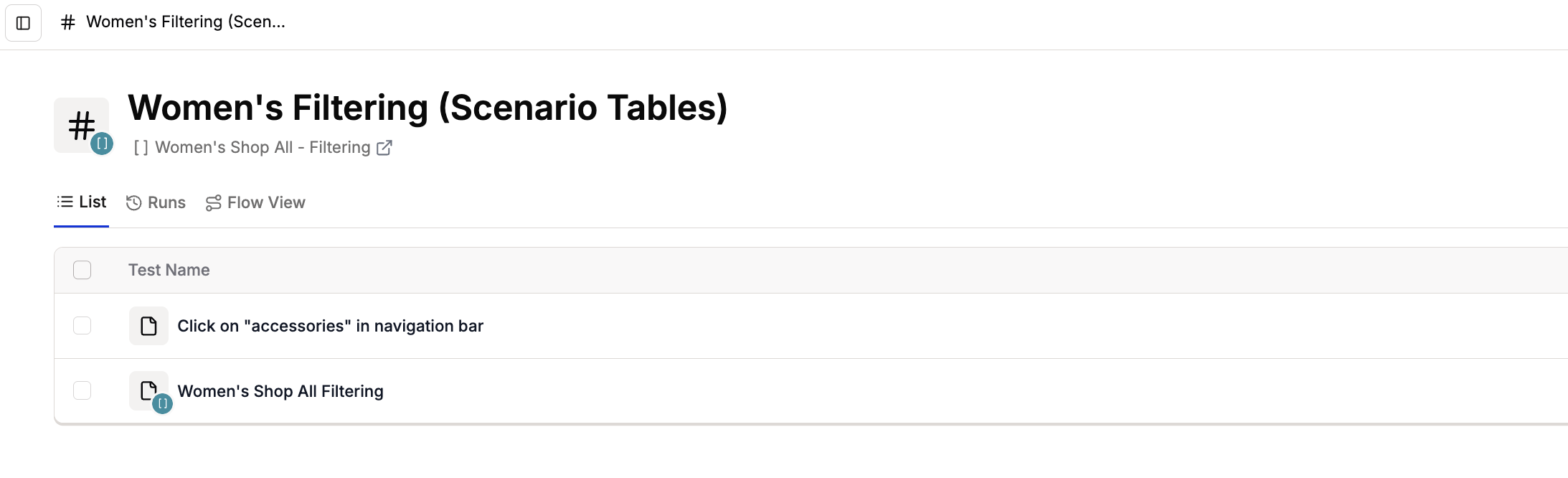
Static tests placed inside a scenario table suite will execute once per scenario row, potentially causing duplicate confirmations or side effects.
**Bad example:**
**Rule of thumb:**
* **Actions** = things the test *does* (e.g., click, scroll)
* **Verifications** = things the test *checks* (e.g., visible, present)
Keep them in separate steps.
**What happens:**\
Static tests placed inside a scenario table suite will execute once per scenario row, potentially causing duplicate confirmations or side effects.
**Bad example:**
 **Good practice:**\
Keep tests that do not rely on scenario table variables in a separate test or suite. This prevents static verifications from running multiple times.
**Good practice:**\
Keep tests that do not rely on scenario table variables in a separate test or suite. This prevents static verifications from running multiple times.
 **What happens:**\
Spur can’t interpret `Go to URL` commands mid-test, causing scripts to fail.
**Bad example:**
**What happens:**\
Spur can’t interpret `Go to URL` commands mid-test, causing scripts to fail.
**Bad example:**
 **Good example:**
1. Set the **Start URL** in your test’s settings:
**Good example:**
1. Set the **Start URL** in your test’s settings:
 2. Use actions for in-test navigation:
 **What happens:**\
Tests may break or misinterpret intent if you attempt to change tabs or navigate the browser without using supported actions.
**What to do:**\
Use browser action steps for any tab or navigation changes. For example:
**What happens:**\
Tests may break or misinterpret intent if you attempt to change tabs or navigate the browser without using supported actions.
**What to do:**\
Use browser action steps for any tab or navigation changes. For example:
 Or set the navigation using [Browser Actions](/authoring-tests/test-side-peek/step-types/browser/open-new-tab).
Always use the documented browser actions component for tab switches, window focus, and URL navigations.
**What happens:**\
The agent only interacts with elements in view unless instructed otherwise. Tests may fail to locate off-screen elements.
**What to do:**\
Explicitly include scroll steps before verifications or actions. For example:
Or set the navigation using [Browser Actions](/authoring-tests/test-side-peek/step-types/browser/open-new-tab).
Always use the documented browser actions component for tab switches, window focus, and URL navigations.
**What happens:**\
The agent only interacts with elements in view unless instructed otherwise. Tests may fail to locate off-screen elements.
**What to do:**\
Explicitly include scroll steps before verifications or actions. For example:
 The agent will also scroll to find out-of-viewport items, but specifying scrolls improves test stability. See [Supported Actions: Scroll](/authoring-tests/test-side-peek/step-types/actions/scroll).
Remember that the agent sees only what a human sees. Include scroll instructions to ensure consistent element visibility.
**What happens:**\
Direct navigation to restricted domains (e.g., spurmail.com) may be blocked due to IP restrictions.
**What to do:**\
Access these domains through the Preview Editor, which proxies requests and bypasses IP blocks. When you run the test normally, the agent routes via Preview Editor and executes steps successfully.
Use the Preview Editor view to interact with spurmail.com. Direct browser access may show a blocked IP error, but tests will pass when executed through Spur Preview.
## ✅ Authoring Do’s & Don’ts
| ❌ Don’t | ✅ Do |
| -------------------------------------------------------------------------- | ------------------------------------------------------------------ |
| Mix actions and verifications | Keep actions and checks in separate steps |
| Use “Go to URL” mid-test | Set the start URL in test settings |
| Combine static steps inside scenario loops | Keep tables fully dynamic; extract shared setup |
| Attempt tab or browser navigations without
The agent will also scroll to find out-of-viewport items, but specifying scrolls improves test stability. See [Supported Actions: Scroll](/authoring-tests/test-side-peek/step-types/actions/scroll).
Remember that the agent sees only what a human sees. Include scroll instructions to ensure consistent element visibility.
**What happens:**\
Direct navigation to restricted domains (e.g., spurmail.com) may be blocked due to IP restrictions.
**What to do:**\
Access these domains through the Preview Editor, which proxies requests and bypasses IP blocks. When you run the test normally, the agent routes via Preview Editor and executes steps successfully.
Use the Preview Editor view to interact with spurmail.com. Direct browser access may show a blocked IP error, but tests will pass when executed through Spur Preview.
## ✅ Authoring Do’s & Don’ts
| ❌ Don’t | ✅ Do |
| -------------------------------------------------------------------------- | ------------------------------------------------------------------ |
| Mix actions and verifications | Keep actions and checks in separate steps |
| Use “Go to URL” mid-test | Set the start URL in test settings |
| Combine static steps inside scenario loops | Keep tables fully dynamic; extract shared setup |
| Attempt tab or browser navigations without
browser actions | Use browser action steps for tab/window
navigation |
| Omit scroll instructions | Explicitly include scroll steps before
actions/verifications |
| Rely on direct navigation to restricted
domains (e.g., spurmail.com) | Access via Preview Editor to bypass IP restrictions |