
Upgraded Spur AI Charts, Loom & Linear in Spur AI Chat, Mobile Launcher Redesign, and More
Loom Video-to-Test in Spur AI Chat
Drop a Loom link into Spur AI and it will pull the recording, generate the test steps, and hand you back a ready-to-run test — no manual step-by-step transcription required.Learn more about Spur AILinear Ticket → Tests in Spur AI Chat
Spur AI can now fetch a Linear ticket the same way it fetches Jira issues, then generate tests from the ticket’s description, acceptance criteria, and attached images. Reproduction steps in the ticket become the test steps.Learn more about the Linear integrationTicket Images in Spur AI Context
When Spur AI fetches a Jira or Linear ticket, embedded and attached images are pulled in alongside the text — so mockups, error screenshots, and diagrams inform the tests and analysis it produces.Upgraded Charts in Spur AI
Charts generated by Spur AI got a substantial upgrade. Every chart now has a hover toolbar for exploring, exporting, and sharing results without leaving the chat.- New chart types — Scatter, donut, and heatmap join the existing set, and a dedicated browsers chart shows per-browser coverage as an icon row.
- Coverage matrix as a first-class chart — Ask Spur AI for coverage and you get a suite-by-environment matrix with real environment colors, collapsible flow groups, and a full-screen expand view for dense data.
- Interactive toolbar — Expand any chart to fullscreen, toggle to a data-table view, or click a legend entry to show and hide a series.
- Export anywhere — Export any chart as PDF (chart plus data table and caption), PNG, SVG, or CSV, or copy the chart image straight to your clipboard. The coverage-matrix PDF paginates as a landscape table so large matrices stay legible.
Redesigned Mobile Preview Build Launcher
The Launch Device experience for mobile has a new look: a clearer launcher button, an intro modal explaining the streaming session, a countdown timer that fades red in the final minute of the 10-minute session, and skeleton loaders while builds and headers load.Learn more about Mobile StreamingStale Build Warning on Launch Device
When the build a mobile run used no longer matches the environment’s current build, the Launch Device button surfaces a tooltip and modal callout showing both filenames — so you know before launching that you’re about to open a different build than the one under test.Cursor Position on Mobile Action History
Mobile test action screenshots now show a tap overlay at the exact interaction point, mirroring the cursor overlay already available for web actions. Overlays are only drawn when Spur has a reliable tap position for the action.Updates
- Slash-command dropdown follows your cursor — The
/shortcut menu now anchors to your cursor with viewport collision handling, so it opens where you’re typing instead of jumping to a fixed position. - Review flow layout refinements — The Test Plan Review flow collapses to a single column at a narrower width, and the activity timeline opens by default only when there’s activity to see or you’re on a wide screen.
- Better test plan summary emails — Scheduled batch runs display the correct run time, and summary email counts, dates, and timezone are now accurate.
Bug Fixes
- Environment header pre-fill — Copying environment properties no longer drops headers when the target row doesn’t exist yet.
- Suite dependencies preserved on save — Saving a suite no longer drops tests from its dependencies list.
- Launch Device opens the run’s build — Re-pointing a test to a different build after a run no longer changes which build Launch Device opens from that run’s result page.
- GitLab integration logo — The GitLab logo on the Integrations page now renders correctly.
- Coverage snapshot and heatmap columns — Fixed suite keying in coverage snapshots and environment column rendering in the heatmap.
- New chat button contrast — The “new chat” button is now easier to see when you’re already viewing an existing chat.
Linear Export Parity, Rich Ticket Exports, and Improved Warnings for All
Linear Integration at Parity with Jira
Export bugs from test failures and warnings to Linear with the same depth as Jira. Pick your team, project, priority, assignee, and labels from the ticket creation modal, and Spur pre-populates the ticket with test context.- Full team/project/milestone selection
- Rich, formatted issue bodies with reproduction context from the failing run
- Same flow whether you’re filing from a failure or a warning
Rich Ticket Exports and Redesigned Copy Modal
The Create Ticket and Copy flows now share a consistent export target picker and produce richer, better-formatted content for both Jira and Linear.- Warnings can be exported as tickets, not just failures
- Copy modal redesigned to make it easier to grab a shareable summary of a run
- Formatted markdown bodies preserve steps, warnings, and links
Improved Warnings for Everyone
Improved warnings are now enabled for all workspaces — no flag required. See grouped, prioritized warnings on every test result.Learn more about test overview and warningsUpdates
- AI Test Generator removed from sidebar — The standalone AI Test Generator entry has been removed from the main navigation. Test generation continues to be available from within suites and tests.
Bug Fixes
- Teardown dependencies — In suites where all dependencies are teardown steps, they now lay out in a row instead of awkwardly stacking.
- Runs table alignment — Fixed row width and alignment issues in the Runs table.
- Tooltip positioning — Tooltips near container-query boundaries no longer render with an incorrect anchor offset.
Spur AI for Everyone, Sidebar Alerts, and More
Spur AI Available to All Users
Spur AI is now on for every workspace. Ask questions about your tests, runs, and suites directly from the in-app chat panel.- Toasts and notifications automatically reposition around the chat widget so nothing gets covered
- Composer text is preserved when switching between dock modes
- Attaching files no longer collapses the question card
Sidebar Alerts
A new sidebar alerts surface highlights items that need your attention, with one-click actions that deep-link straight to the relevant filtered view.Team-Scoped Dashboard Date Range
The dashboard date-range picker now defaults to your team’s scope, so the view you land on reflects what your team has been running rather than a global default.Environment Variables in API Call Steps
API call steps now reference environment variables by ID across URL, header, query, and body fields. Renaming a variable keeps every existing API call wired up correctly, and tokens insert cleanly at the cursor — including inside JSON bodies. Learn more about environment variables.Fixes
- Test step selection is now instant
- Failed-tab scenario badges are derived per-task for accurate counts
- Expanded rows on the test overview have cleaner spacing and a tooltip for truncated titles
Spur AI Across the App, Pass Rate Insights, and Review Flow Grouping
Spur AI Across the App
Spur AI now lives across the entire app as a persistent, dockable widget. Ask questions about your tests, suites, and runs from anywhere — chat sessions follow you between pages, and recent conversations are one click away.- Available on every page from a single chat widget
- Dock the chat to the side or float it as a compact panel
- Picks up context from the page you’re on
- Quick access to recent chat sessions
Team-Default Pass Rate and Scoped Insights
Pick the pass rate definition that matches how your team thinks about quality, and Insights will follow.- Choose a team-wide default: Test Plan, Scheduled, Non-Draft, Most Recent, or Overall
- The dashboard overview card shows a headline pass rate plus an expandable per-mode breakdown
- Insights re-scopes its summary and chart to match the selected mode
Group Tests in the Test Plan Review Flow
The Test Plan Review sidebar now has a Group by dropdown so you can attack failures the way that makes the most sense for the run.- Group by Failure Reason (default), Folder + Suite, Environment, or Scenario
- Folder + Suite uses a two-level nested view
- Your grouping selection persists in the URL so you can share or bookmark it
Updates
- Cmd+Enter in API test steps — Save and collapse an API step with a keyboard shortcut instead of reaching for the mouse.
- “Reviewer” column — The Test Review table’s “Reviewed By” column is now labeled “Reviewer” for clarity.
Bug Fixes
- Spur AI charts now use distinct brand-palette colors so series are easier to tell apart.
Plan Runs Grouping, Integrations Redesign, and More
New Features
Plan runs grouped by plan on the homepageReview-pending plan runs on the homepage are now grouped by test plan. Only the latest run per plan is shown, with older runs tucked behind a caret you can expand. A “Latest” badge surfaces how many older runs are collapsed, and the expanded review status card resizes with your sidebar.Learn more about test plan reviewsCursor overlay in the image viewerScreenshots from web test actions now show a cursor overlay at the interaction point, making it easier to see exactly what each step clicked, hovered, or typed into.Mobiletap_visual and drag actionsMobile tests now support tap_visual and drag actions for more precise gesture control.Learn more about mobile promptingSave Cached Action output as a {{var}}A Cached Action named save:<key> now exposes its return value as <key> in the {{var}} picker for later steps — mirroring how API Call save_response_to keys already work.Updates
Integrations page redesignManage Integrations is now organized into three sections — Notifications, Issue Tracking, and Developer Tools — laid out as a two-column grid. Cards share consistent spacing and styling across every integration.Learn more about integrationsOne-off Authorization header in API stepsAPI steps now accept a one-offAuthorization header, so you can override auth for a single request without touching environment configuration.Richer Jira context in Spur AIWhen Spur AI fetches a Jira ticket, it now includes the first few comments inline and can page through the rest — giving it more context when reasoning about an issue.Bug Fixes
- Replacing a Scenario table with a full CSV no longer reshuffles column IDs when column names are identical.
- Scenario table CSV update errors now display correctly, and toasts render above dark backgrounds.
API Call Step, Test Plan Run Accounting, Jira & Mobile Improvements
API Call Step
Make HTTP requests directly from your tests as a first-class step type.- GET and POST requests with JSON body, structured query params, and custom headers
- Insert environment headers and secrets from a dropdown, automatically resolved per environment
- Reference scenario table variables anywhere in the URL, headers, query, or body
- Save responses to a variable with
save_response_toand reuse them in later steps (including dependency tests) - Optional
save_fulltoggle to keep the full response without truncation - Configure per-request
timeoutandexpect_statusfor assertions - Response body preview rendered inline in the result view
Test Plan Run Accounting
More accurate and transparent run counts for test plans.- Accurate run pills that account for scenario fan-out and dependency-aware “missing” runs
- Hover drilldowns on run pills to see exactly what passed, failed, or didn’t run
- Expected-runs tooltip previews how many runs a plan will produce before you schedule it
- Fewer false-positive “missing run” reports
- Tightened layout on the latest run summary
Updates
- Mobile playback — Cursor is now rendered server-side for mobile runs, producing cleaner and more consistent playback.
- Jira integration — Hardened reliability with site URL caching and request deduplication.
Bug Fixes
- Jira modal — Issue type changes now clear stale status so validation can’t be bypassed; metadata loading fixed.
- Test plan recipients — Internal
@tryspur.devemails are now hidden from the recipient picker for non-Spur users. - Chat input — Clicking the padding around the chat box now correctly focuses the input.
Mobile Streaming, Lightbox & PR Agent Improvements
New Features
Mobile streaming launch pickerPick which environment header (including secrets) to use when launching a mobile streaming session. Switch environments and the picker stays in sync so the right credentials are always selected.Trackpad and gesture support in mobile streamingTrackpad scroll now translates to device swipes, and Android sessions support unified swipe and text input gestures — so mobile streaming feels closer to using a real device. Learn more in Mobile Prompting.Expand agent screenshots in chatClick any screenshot the agent posts in chat to open it full-size in a lightbox, making it easier to inspect what the agent saw at each step.Redesigned test plan summary emailTest plan summary emails have been rebuilt for better cross-client rendering, cleaner layout, and improved mobile display. See Test Plans for setup.Updates
- GitHub PR agent: Richer status reporting in PR comments. See the GitHub Agent docs.
- Custom context in PR agent runs: Provide additional context alongside override URLs when triggering tests from a pull request.
Bug Fixes
- Test plan summary email donut chart now renders fonts correctly across email clients, and summary stats align with the run detail page.
- PR agent no longer shows in-progress generated tests as “Error” and resolves stuck “Running” statuses.
- Fixed an issue where suite dependencies could be unintentionally wiped.
- Fixed horizontal overflow and a hidden CTA in the test plan “Choose Scenarios” modal when working with wide tables.
- Fixed scenario badge overflow in the test suite latest result cell.
- Fixed styling issues in the network tab.
GitHub Agent: More Triggers, Richer Context
GitHub Agent Improvements
- New
/trigger prefix — Use/spurinstead of@spurto invoke the agent without sending a GitHub notification to the bot account - New aliases —
spurtest,spurbot, andspuragentjoinspurandspuraias valid triggers (with either@or/) - Full-comment context — Instructions written before the trigger are now kept and passed to the agent, so you can write a full sentence and drop the mention at the end
- Context applied to existing tests — The extra context you provide in a PR comment is now also forwarded to relevant existing tests Spur re-runs, not just freshly generated ones
Email Summaries, Redesigned Spur AI Chat, and Run Modal Polish
New Features
- Email summaries for Test Plans — Configure email recipients on a Test Plan and receive an “On Finish” summary when the run completes, with pass/fail counts and the failed tests listed inline. Summary emails arrive with the subject
Spur Summary | {plan name} — {passed}/{total} Passed. See Email Alerts. - Redesigned Spur AI chat entry — The chat composer now supports file attachments with rich previews (CSV, XLSX, PDF, images, and more), a click-to-expand image lightbox, and suggestion pills to jump-start common requests. Multi-part follow-up questions render as a swipeable carousel.
Updates
- Run modal: scenario selection — The scenario picker now shows every property column with a sticky header and checkbox column, persists your search across environments, and starts with nothing selected so you pick scenarios deliberately before continuing.
- Test plan list search — Search is now case-, accent-, and whitespace-insensitive, so “Checkout” matches “checkout” and “Café” matches “cafe”.
- Prompt override editing — Cleaner editing experience when overriding AI prompts on a step.
- CSV scenario import — Switching to the CSV import dialog from the new scenario flow now preserves the scenario name and description you’ve already typed.
- Spur AI external links — Links to
app.spurtest.cominside Spur AI open directly instead of going through the external-link confirmation modal.
Bug Fixes
- Long URLs in redirect steps now wrap inside the row instead of overflowing the test view.
Environments and Test Plans
Environments
Run the same tests across Dev, Staging, and Production, as well as across Mobile and Desktop views without duplicating them.- Environment-specific configuration - Set different URLs, headers, credentials, and secret variables for each environment
- One test, multiple environments - Write tests once and run them across all your environments with the right configuration automatically applied
- Viewport per environment - Test mobile and desktop views across all environments, all from the same test
- Quick setup - Duplicate existing environments or pre-fill properties when creating new ones
- Environment badges show which environment each test ran in throughout the UI
Test Plans
Group multiple test suites into scheduled regression runs.- Combine tests from different suites - Pick specific suites in any configuration of environments and viewports, and run them together on a schedule
- Schedule recurring test runs - Set up nightly regression tests, pre-deploy smoke tests, or hourly health checks
- See what will run - Preview expected test count and duration before scheduling
- Track failure patterns - View top failure reasons across your entire test plan to identify systemic issues
- GitHub integration - Trigger test plans from your CI/CD pipeline
- Nightly regression: Run all critical user flows across every module
- Pre-deploy smoke tests: Execute key tests from multiple suites before each release
- Scheduled health checks: Monitor production every hour with a curated test plan
AI Test Generation Enhancement
AI Test Generation Enhancement
- Generate tests from Markdown files - Now supports file context for better AI test generation
- Improved test generation accuracy with additional context
Loom-to-Test Major Improvements
Loom-to-Test Major Improvements
- Enhanced Loom video parsing - Better step extraction and verification
- More accurate test generation from recorded videos
- Improved verification steps - More general and reliable test assertions
PDF-to-Test Cases
PDF-to-Test Cases
- Generate test cases directly from PDF documentation - Upload PDFs and automatically extract test scenarios
Test Overview Page
Test Overview Page
- New centralized test overview - See all your tests and their latest status at a glance
- Quick access to test history - View recent runs and failures
- Improved test organization - Better visibility into your test suite health
Slack Unfurl, Bulk Test Run & New Filter Options
Slack Unfurl
View previews of the test run directly in Slack when pasting in the shareable link.Learn more about Slack Unfurls in this video.Bulk Test Run
You can now select multiple individual tests within a single test suite and run them as a bulk action.Learn more about Bulk Test Runs in this video.New Filter Options
The runs history table is now more customizable — chain multiple filters together to create a focused view of your runs.Learn more about Filter Options in this video.Revamped Dashboard & Test Overview Page and Warnings
Revamped Dashboard
The new dashboard collects the most commonly used features on Spur — see your test runs at a glance, and jump right back into your recently edited tests. The dashboard includes a new Insights tab for a bird’s-eye view of test runs.Learn more about the Revamped Dashboard in this video.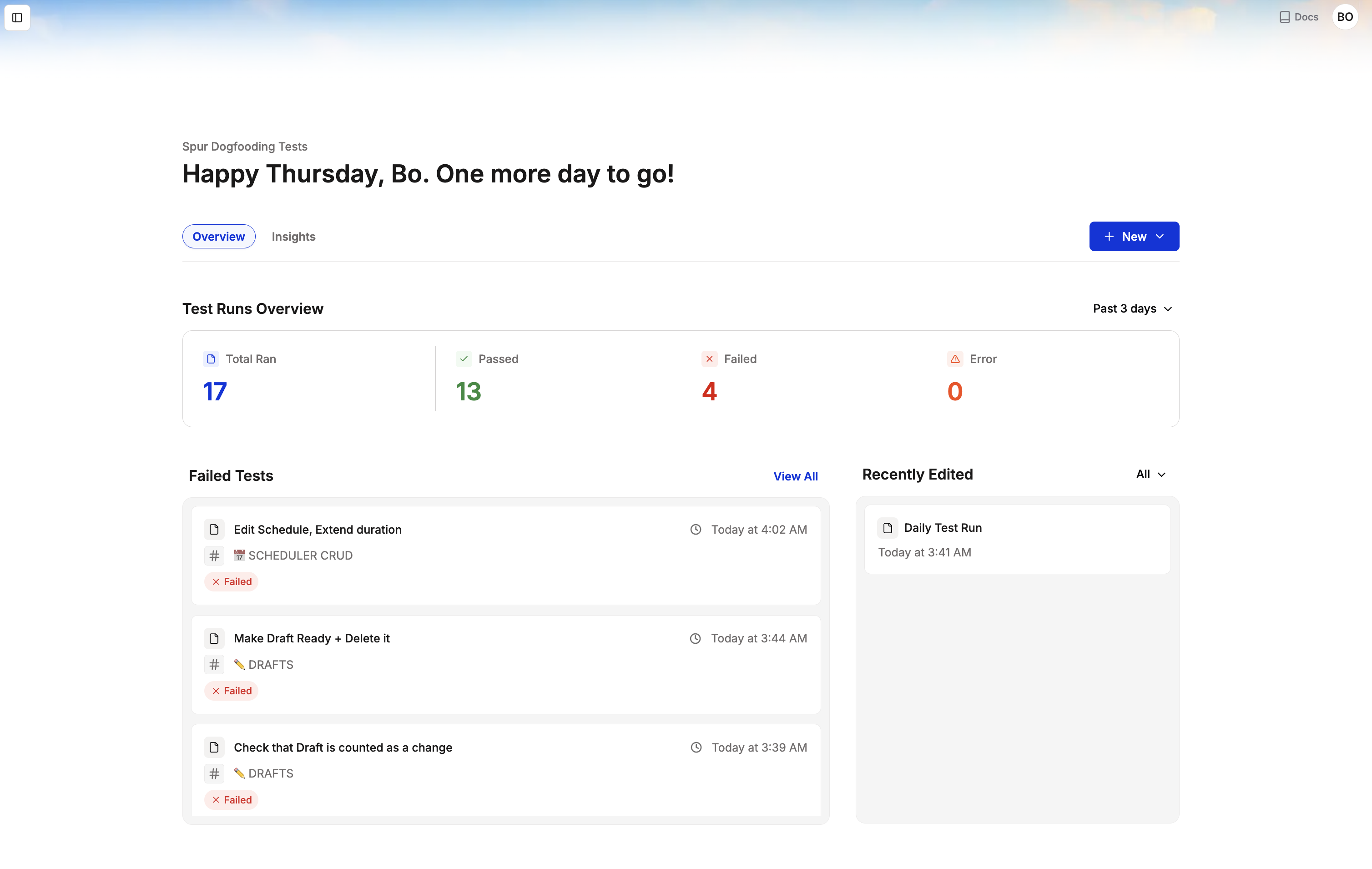
Test Overview Page and Warnings
The new Test Overview page shows the results of all your tests. Find it in your sidebar to get a summary of recent failures and see which tests Spur has warnings about.PDF Export
PDF Export
Export your test runs as PDFs. Find this in the Share menu of a test result.Learn more about PDF Exports in this video.Loom to Test
Folders
Folders
Folders make it easier to organize your suites on Spur. Apart from organizing, you can also perform bulk actions on suites within Folders. Learn more about Folders in this video.Revamped Dashboard
Revamped Dashboard
The revamped Dashboard is cleaner, calmer, and makes it easier to get to the information you need.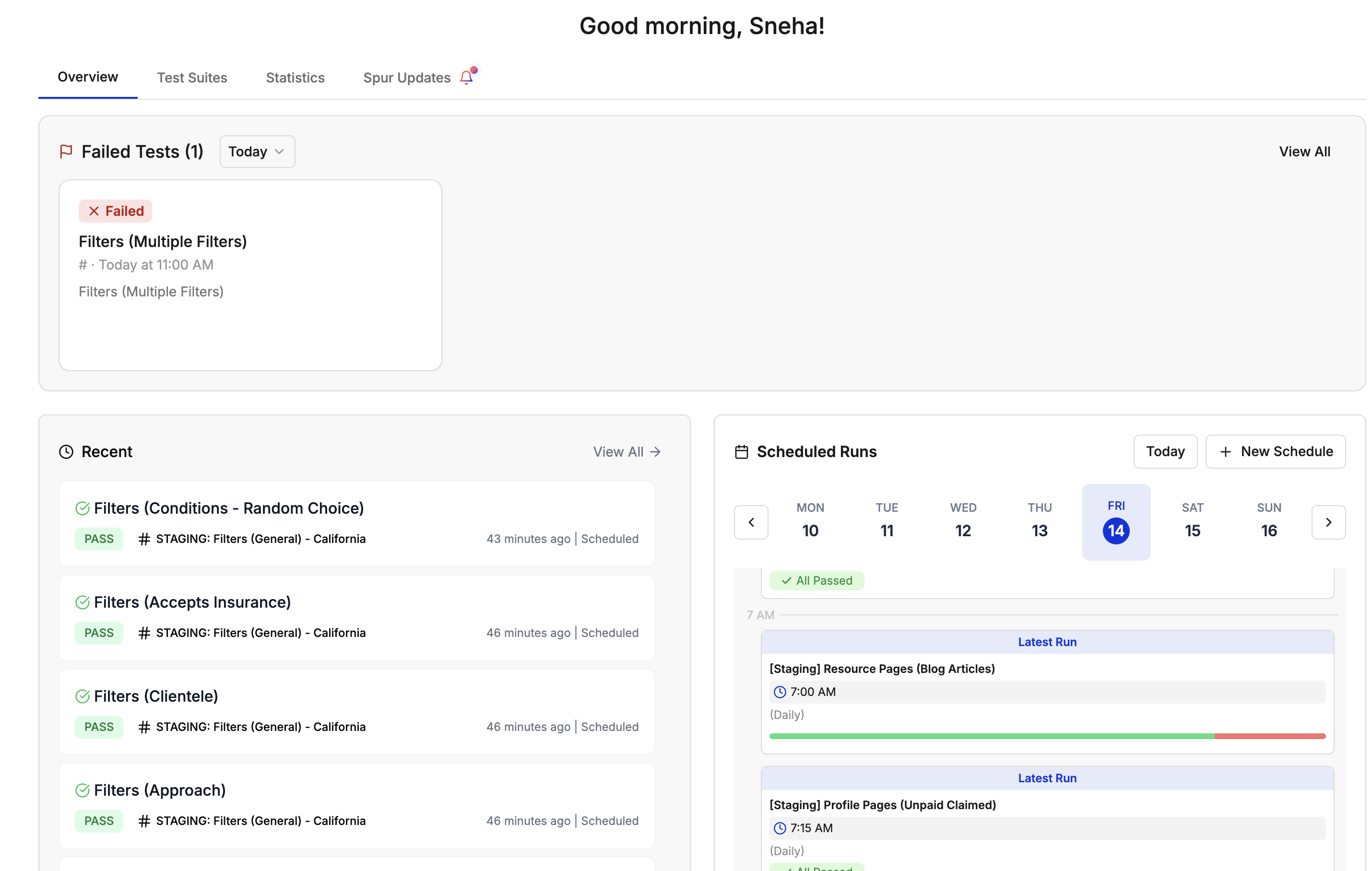
One Click Bug Reports
One Click Bug Reports
Instead of having bug tickets created on Linear and Jira automatically, you can now manually create and send a ticket from the test result page.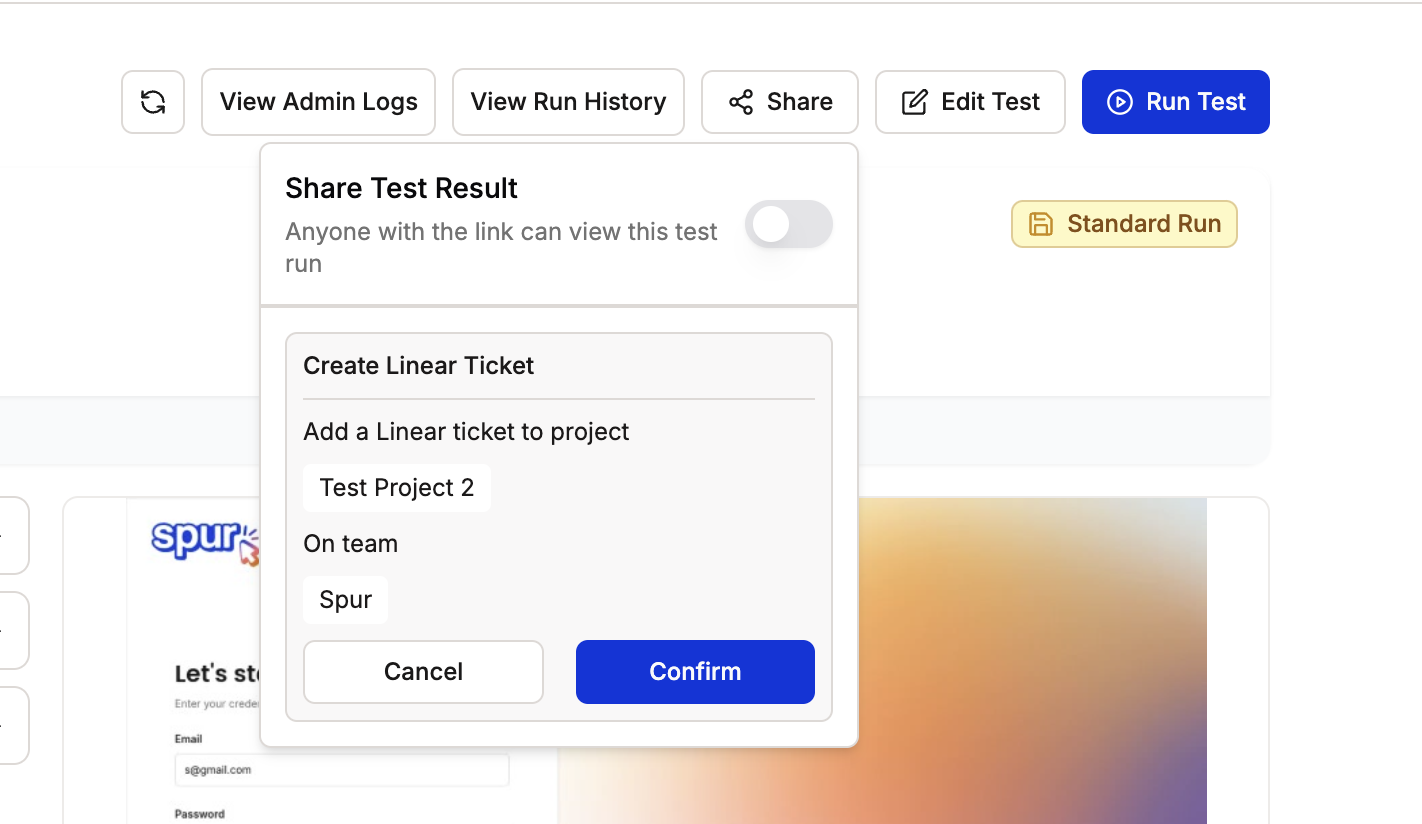
Scheduled Tests Results
Scheduled Tests Results
The Scheduler now shows results within the calendar view.Learn more about the Scheduler page.Edit URLs (Within a Suite)
Edit URLs (Within a Suite)
Edit the URLs for all the tests within a suite — either the domain or the full URL.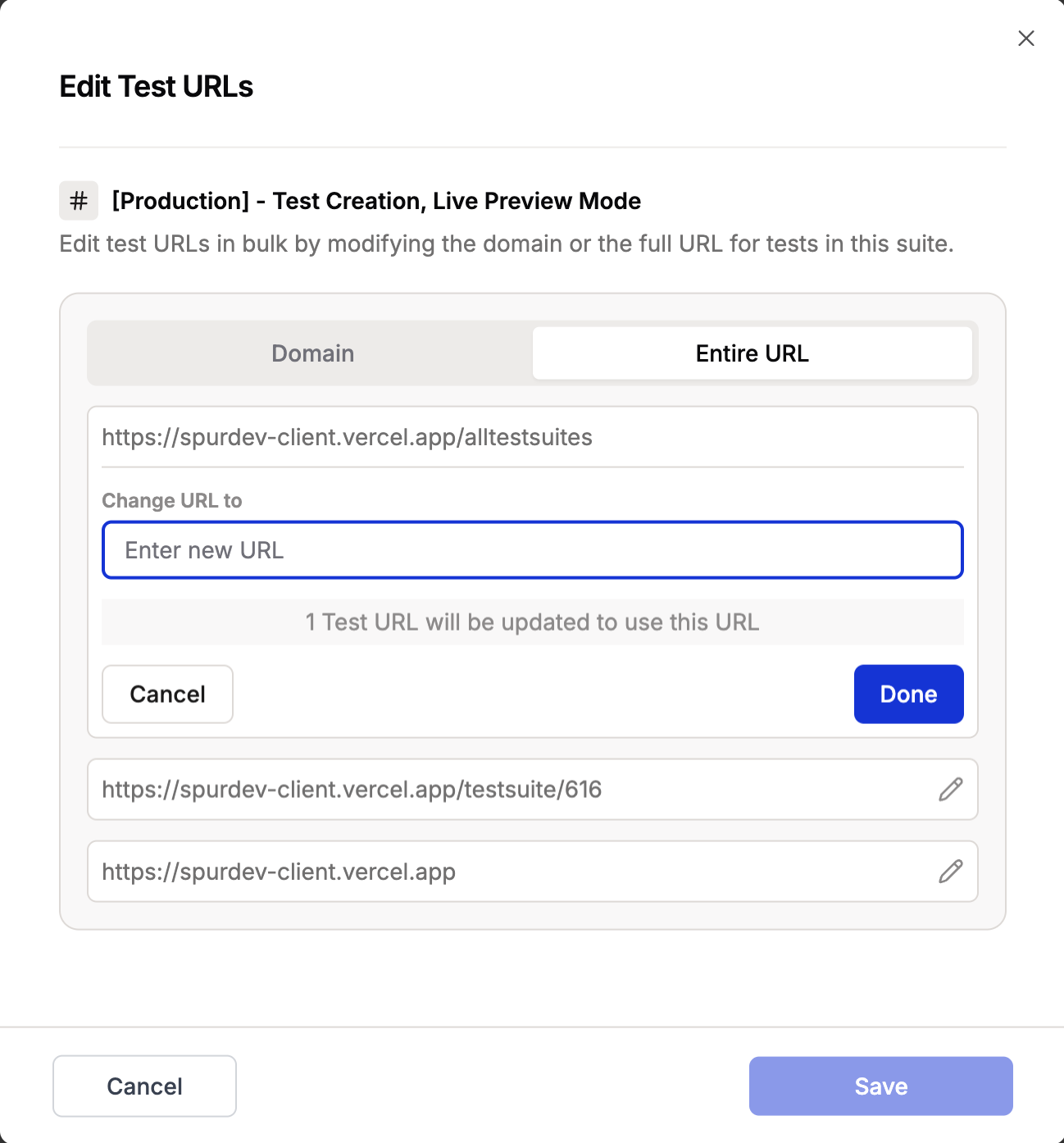
Login State Selector improvements
Login State Selector Improvements
Search and filter when choosing a login state for a new test.Learn more about the login state selector.View Past Runs in the Scheduler
View Past Runs in the Scheduler
You can now view all past runs directly in the scheduler calendar.Learn more about the scheduler.Duplicating Suites and Scroll Offset Estimations
Duplicating Suites and Changing Base URLs
Duplicate test suites and change URLs across different environments.Learn more about duplicating suites hereScroll Offset Estimations
Scroll Offset Estimations
Added a scroll estimator tab to the Preview Editor, so you can quantify scroll offsets, as well as page and window dimensions.Learn more about scroll offset estimations hereHTTP Request Override
HTTP Request Override
HTTP request overrides for advanced testing scenarios. Use them for A/B testing, header modifications, and internal logic testing. Watch the demo to see how you can modify headers and test different scenarios.Learn more about advanced HTTP settings hereSnoozing Tests
Snoozing Tests
You can now temporarily mute tests until a selected period. When snoozing a test, any dependencies will also be automatically snoozed during batch runs, helping you manage test execution more effectively.Learn more about snoozing tests hereEnhanced Daily Summaries
Enhanced Daily Summaries
Get daily test summaries through Slack and Email. For Slack notifications, you can now customize your channel name — disconnect and reconnect to choose a different channel than the default #spur_alerts.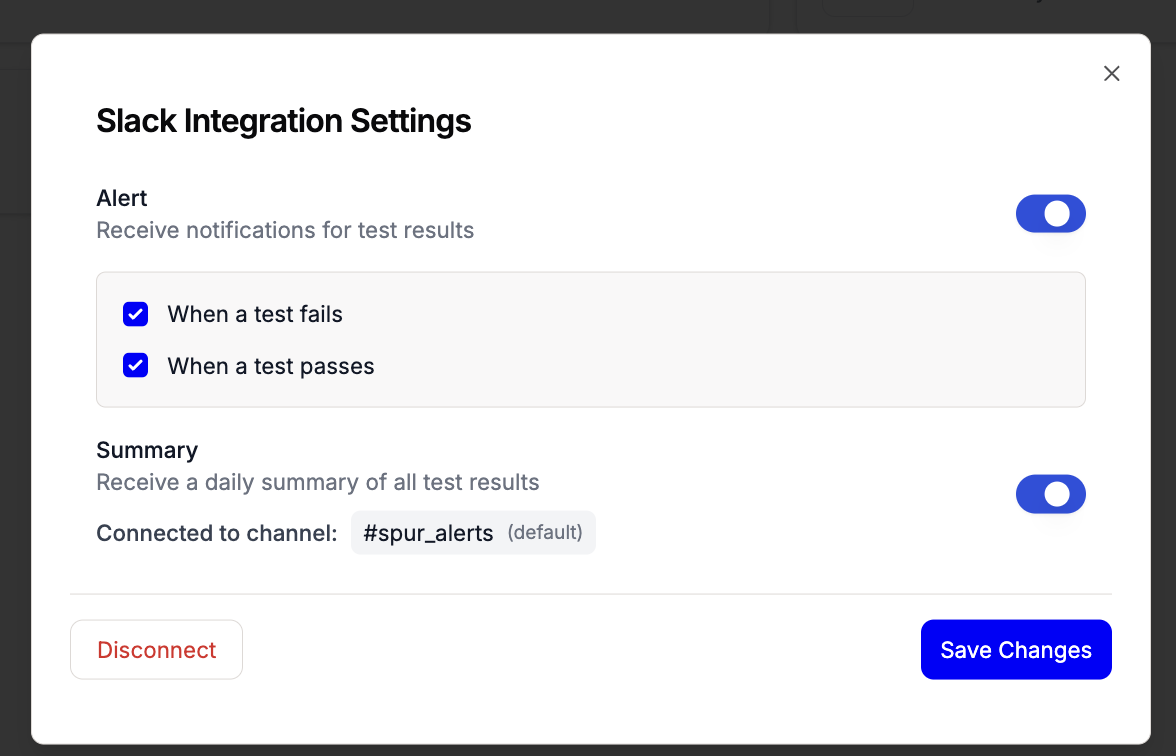
Revamped Integrations Dashboard
Revamped Integrations Dashboard
The redesigned integrations page features a cleaner interface with GitHub, Slack, Linear, Jira, and Email integrations all in one place. Each integration comes with an active/inactive status indicator and easy access to settings.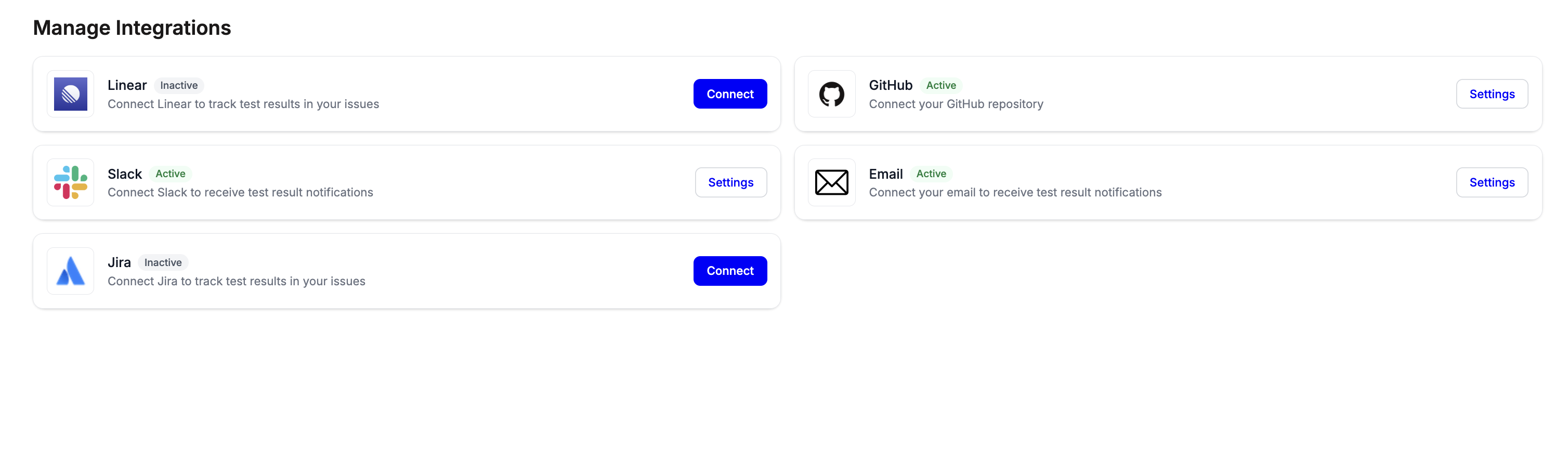
Shareable Run Results
Shareable Run Results
Share your test results with anyone using shareable links. Copy the link and share it with your team members or stakeholders — no login required.Learn more about shareable run results hereGlobal Search
Global Search
Search for tests, test suites, and more from anywhere in the application. Quick access to everything you need.Watch DemoTest Analytics & Configuration Update
Test Statistics & Analytics
New analytics capabilities to track test performance:- Test statistics dashboard
- Performance trend analysis
- Success rate tracking
- Execution time metrics
Advanced Browser Configuration
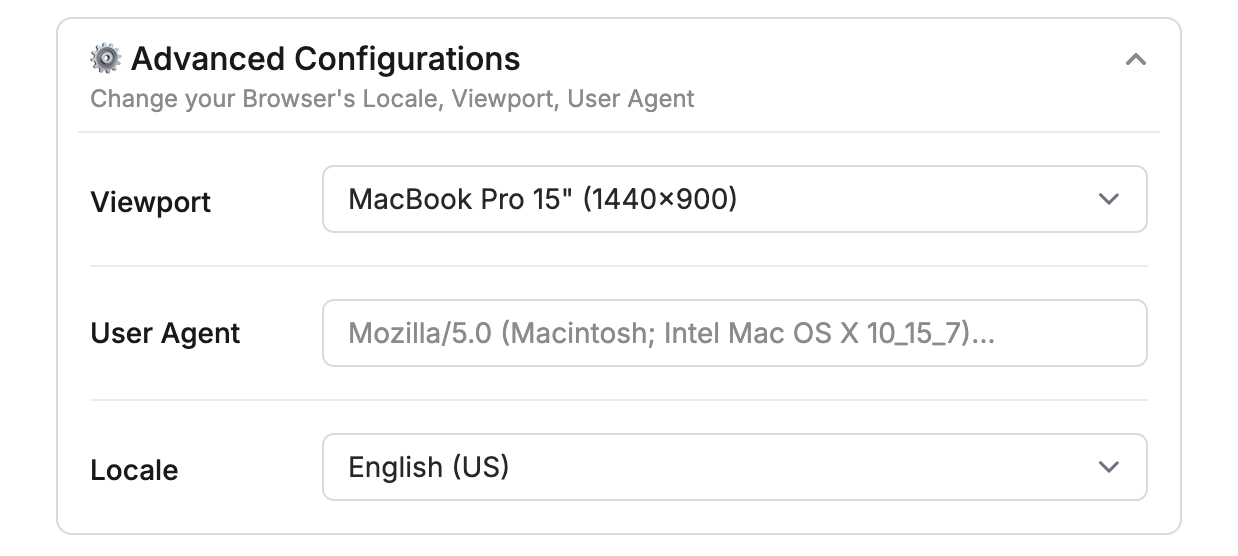
Enhanced browser configuration options:- Browser Locale selection for language/region testing
- Viewport configuration (e.g., MacBook Pro 15” 1440×900)
- User Agent customization
- Flexible environment simulation capabilities
UI/UX Feedback Agent
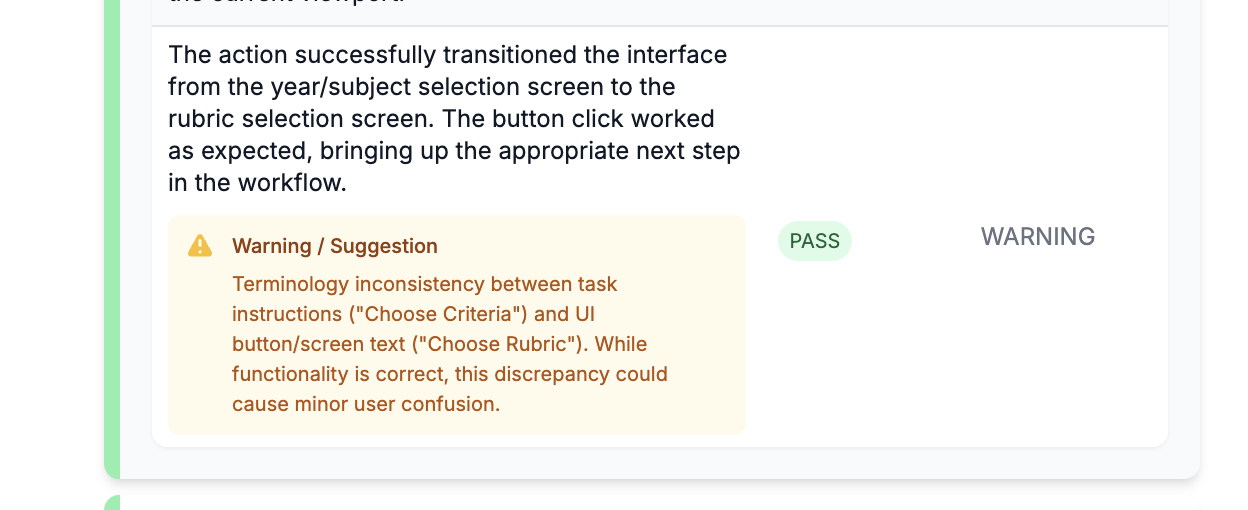
AI-powered interface analysis:- Real-time UX evaluation
- Element visibility verification
- Interaction success validation
- UX consistency checks with detailed warnings
- Actionable improvement suggestions
Dependencies View Update
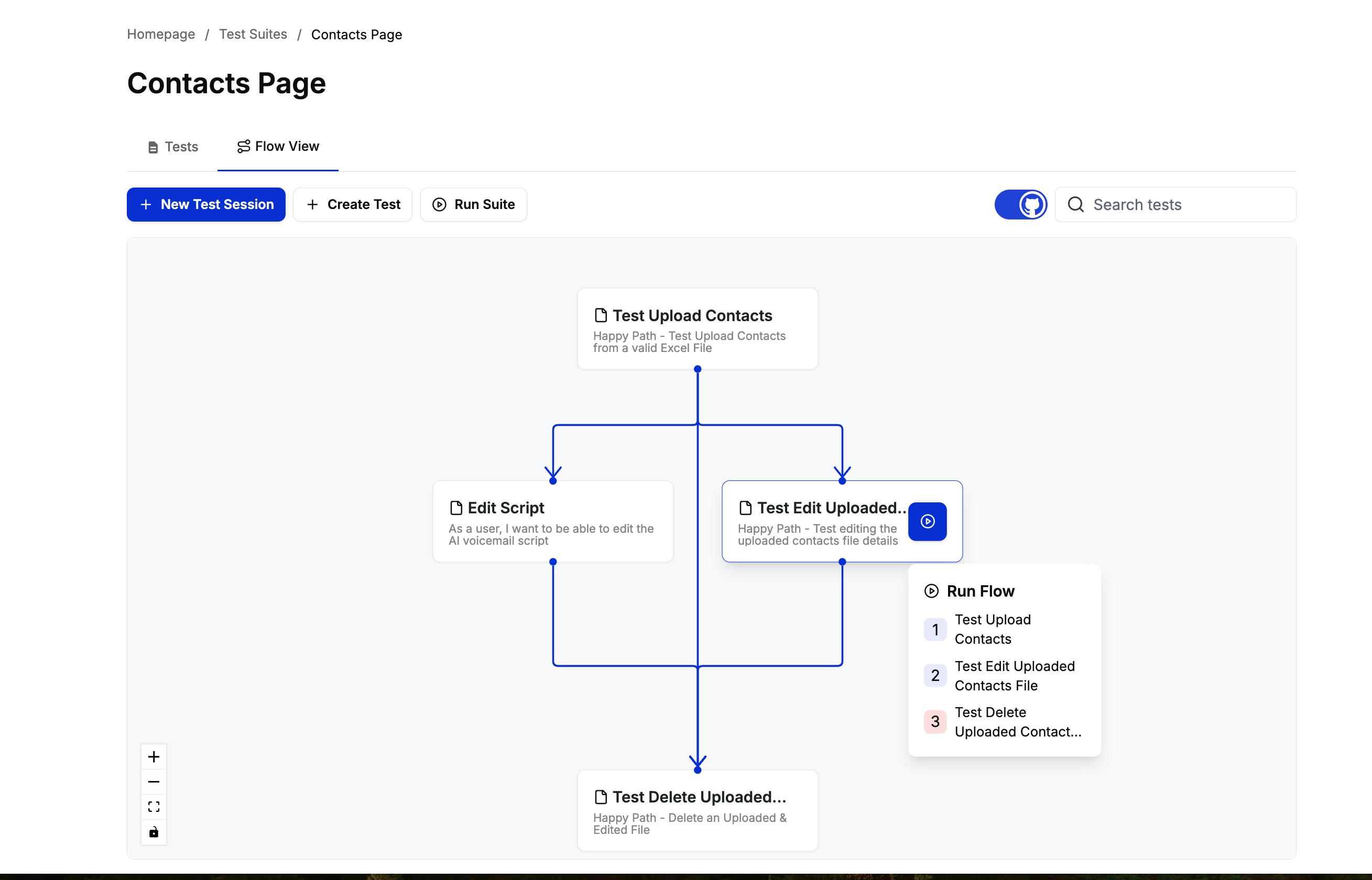
Enhanced Dependencies View
New test dependencies visualization:- Improved visual hierarchy
- Clearer relationship mapping
- Enhanced navigation
- Better test organization
Test Management Update
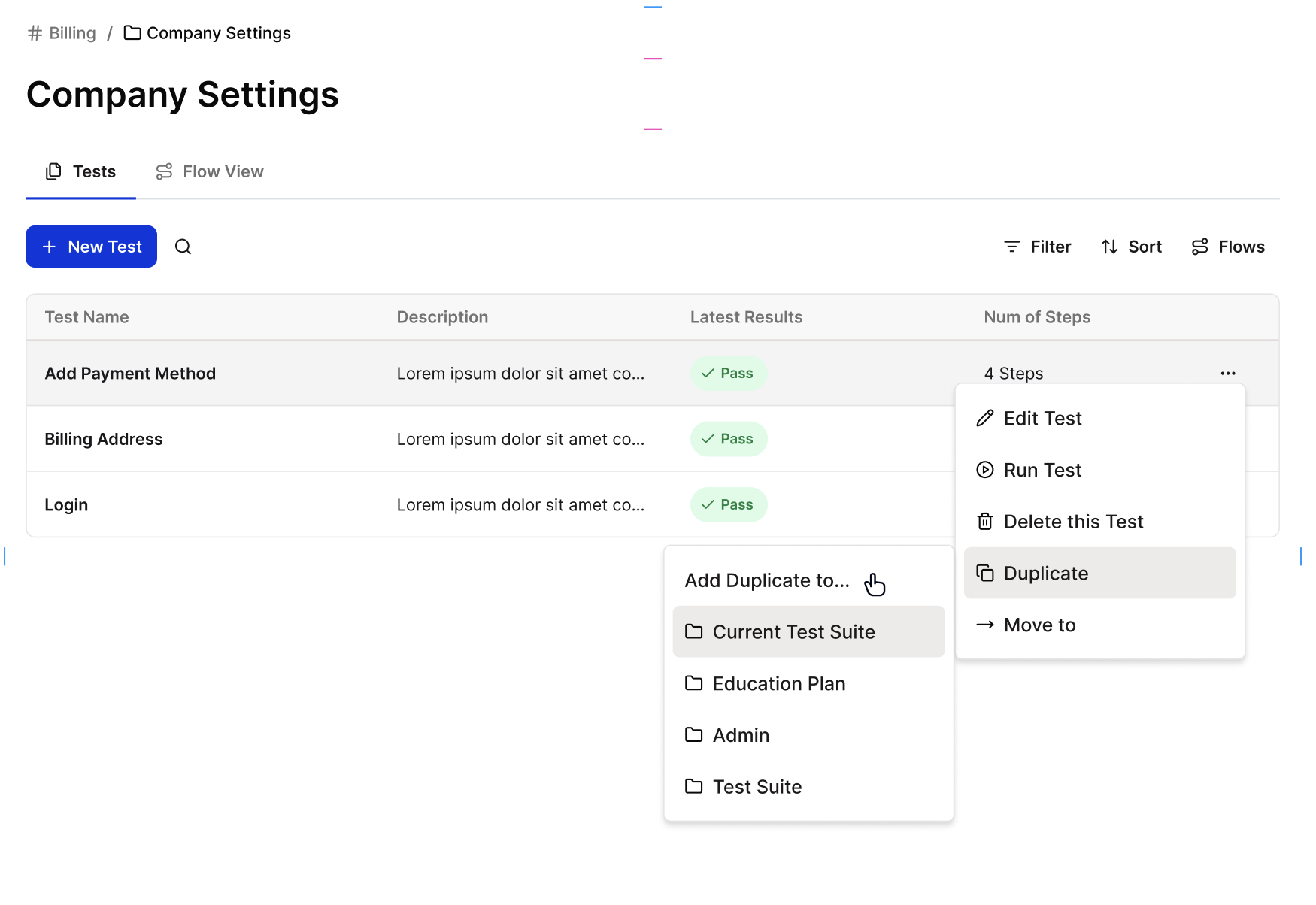
Test Suite Duplication
New test management capabilities:- Duplicate tests across different test suites
- Streamlined test reuse workflow
- Maintain test consistency across suites
- Quick test reproduction
Performance Update
50% Reduction in Test Run Times
Major performance improvements coming to test execution speeds:- Optimized test execution engine
- Faster resource loading
- Improved parallel processing
This update is currently being rolled out
v1.4.0
Enhanced Slack Integration
- Updated message formatting
- Customizable notification settings
- Advanced configuration options
- Real-time test status updates
v1.3.0
Dashboard Refresh
Complete overhaul of the dashboard experience:- New analytics views
- Improved test status tracking
- Enhanced visualization options
- Better organization of test suites
v1.2.0
Multiple File Upload Support
Now supporting multiple file uploads in test steps:- Upload up to 3 files simultaneously
- Broader file format support
- Improved upload reliability
v1.0.0
Live Test Creation
Introducing live test creation.Interactive Test Recording
- Real-time step validation
- Live feedback and suggestions
- Instant test preview
- Step-by-step approval workflow
Video to Test Generation
- Automatic step extraction
- Video timestamp mapping
- Visual step verification
Current Limitations & Tips
- Once a step is approved, it cannot be edited in the current session
- Steps must run in sequence
- After saving the test, full editing capabilities become available
- For users comfortable with prompting, steps can be written directly without preview to save time
Beta Features
- Open-ended actions in live preview mode
- Verification steps
- Agent performance optimization
This is Spur’s biggest update yet.
v0.5.0
Jira Integration
Complete Jira integration suite:- Automatic issue creation
- Test result synchronization
- Two-way status updates
- Custom field mapping
v0.4.0
Environment Variables
Added support for environment variables:- Secure credential management
- Environment-specific configurations
- Variable substitution in tests
v0.3.0
Multi Cookie & Authentication
Enhanced authentication capabilities:- Multiple cookie management
- Advanced auth flows
- Session handling improvements
v0.2.0
JavaScript Actions
New JavaScript execution capabilities:- Custom JS injection
- Script automation support
- Dynamic page manipulation