
Setting up your integrations
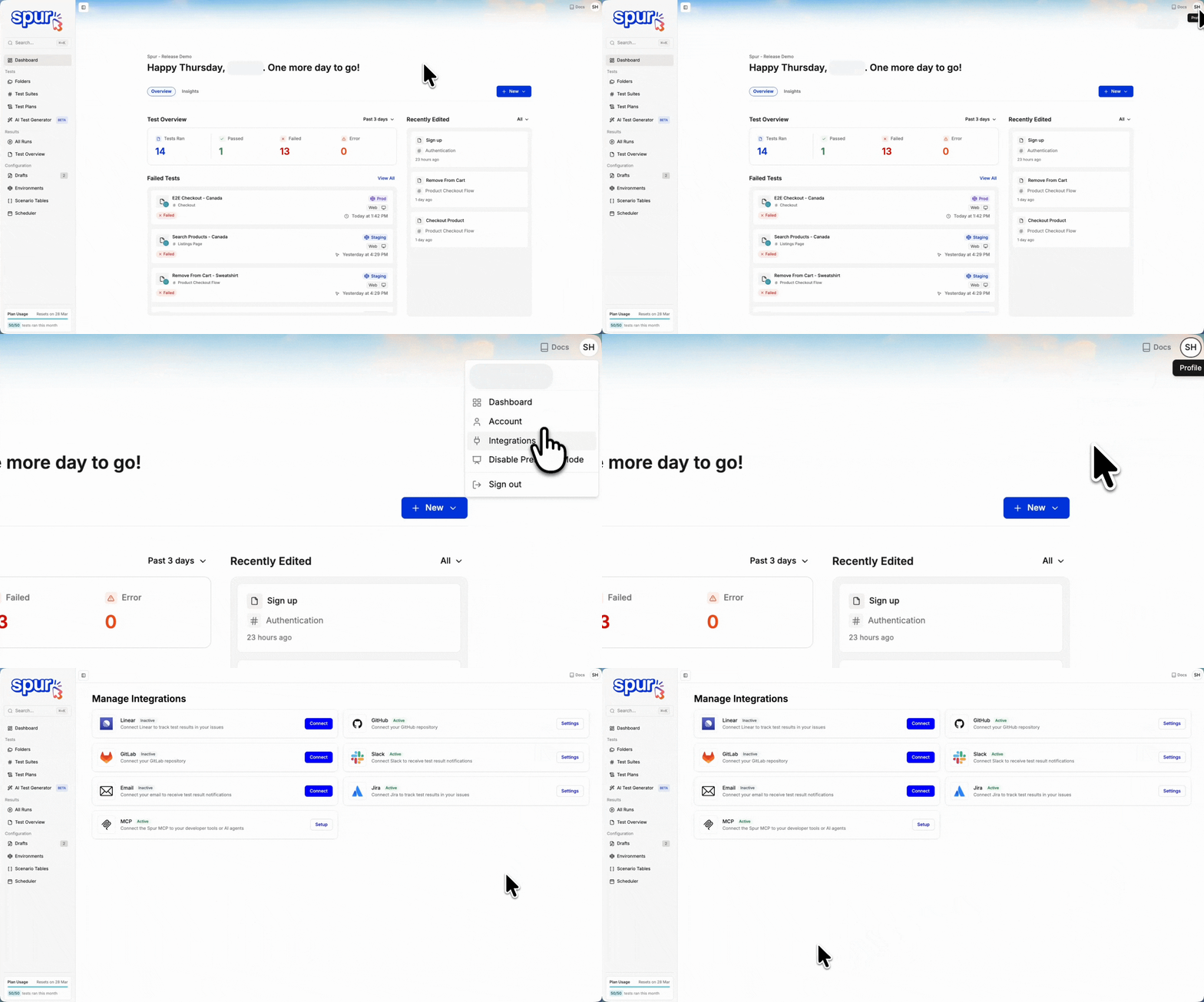
Find your integrations here. Connect them through this page.
- Click the User Profile button in the top right, from any page.
- Click Integrations in the dropdown.
- Connect and manage your integrations.
Reconnect required
Spur checks each connection with the provider when you open the Integrations page. If Slack, Linear, Jira, Azure DevOps, or Vercel rejects Spur’s token, for example because it was revoked or expired, the card shows a Reconnect required badge and the reason below it. Click Reconnect on the card to run the same connect flow again. Your existing settings are kept.Available integrations
Issue tracking & bug reporting
Jira and Linear follow the same workflow in Spur. Both let you create bug tickets from test failures with auto-populated details. The setup and ticket creation steps are identical across both integrations.Azure DevOps files the same auto-populated content, but it connects with a personal access token instead of an OAuth authorization, and anyone with access to the Application can set it up. Follow the Azure DevOps guide rather than the steps above.ClickUp connects with OAuth. See ClickUp Tasks for workspace and list setup.Asana also connects with an OAuth authorization. If your authorization covers more than one workspace, you pick one after you connect. See the Asana guide for workspace and project setup.
Jira
Create detailed Jira tickets directly from test failures with screenshots, logs, and reproduction steps.
Linear
Create Linear issues directly from test failures with auto-populated details and reproduction steps.

Azure DevOps
Create Azure DevOps work items from test results, with project and field defaults from your connected Application.

Asana
Create Asana tasks from test results. Spur AI and the PR Agent can read linked tasks.
ClickUp
Create ClickUp tasks from test results. Spur AI and the PR Agent can read linked tasks.
Communication & notifications
Slack
Real-time notifications and alerts in your Slack workspace
Customizable email notifications and reports
Development workflows
GitHub Actions and GitLab CI/CD run configured Test Plans from your pipeline. GitHub also supports the PR Agent, which selects relevant saved tests and generates browser tests for pull request changes.
GitHub
Choose the PR Agent to test code changes or GitHub Actions to run configured Test Plans.
GitLab
Run Spur tests in your GitLab CI/CD pipelines with automated test execution on merge requests.